Magnetic Grip Ring Mount for iPhone Pro Max: Guide
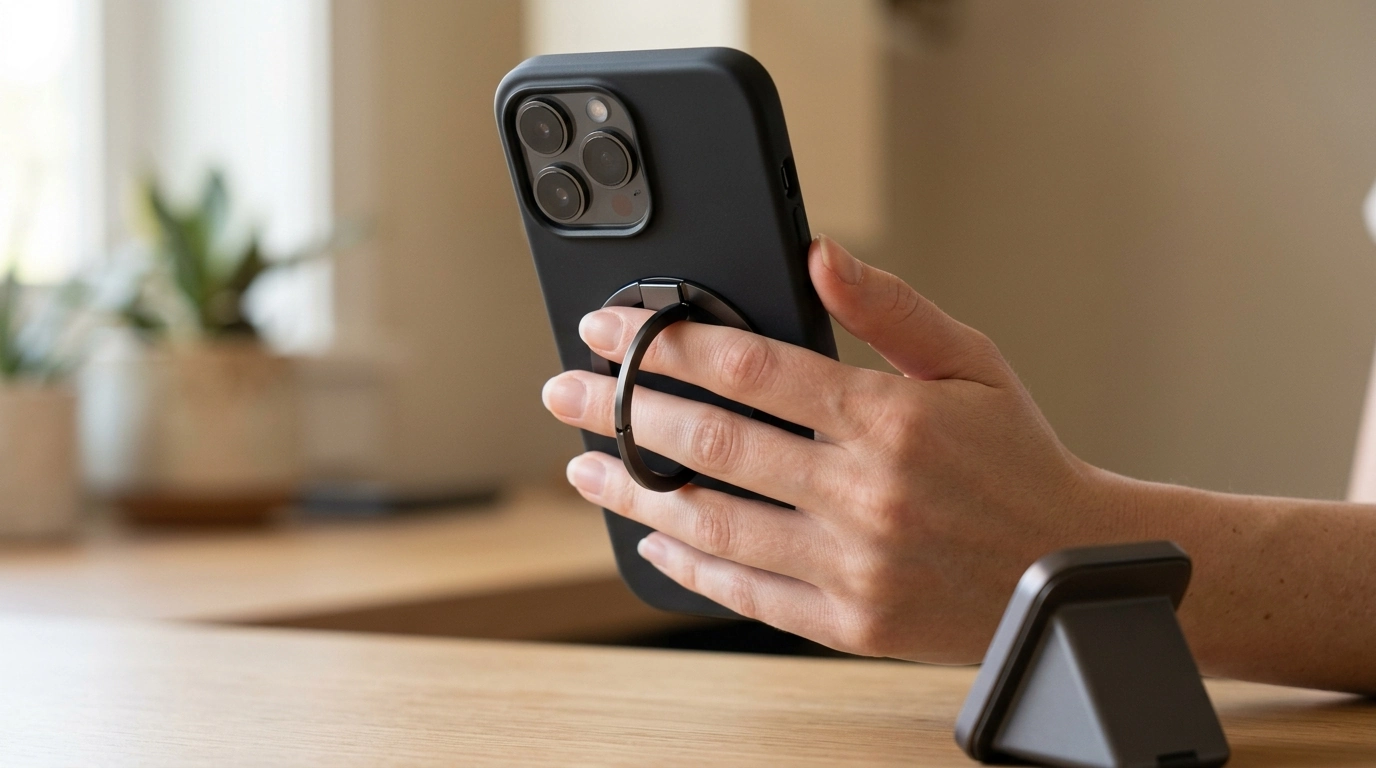
A grip and ring holder that also snaps onto magnetic mounts can make daily phone use feel more secure—especially on larger Pro Max models. The right magnetic grip-ring setup helps with one-handed handling, quick docking in the car or at a desk, and comfortable viewing for calls or videos without juggling a separate stand.
What It Is and When It Helps Most
A magnetic phone mount with a grip and ring holder combines three practical functions in one compact accessory: a magnetic attachment surface for fast docking, a finger grip/ring for steadier holding, and (on many designs) a stand-like support for multiple viewing angles. For bigger phones like an iPhone Pro Max, that mix matters because the extra screen size and weight can make one-handed use feel top-heavy.
It’s especially useful when you’re texting while walking, taking quick photos, or scrolling with your thumb—moments where a simple shift in hand position can turn into a slip. The magnetic side adds a second layer of convenience: you can snap your phone onto a compatible mount in one motion, then lift it off when you’re leaving.
| Situation | What the grip/ring solves | What the magnetic side adds |
|---|---|---|
| Commuting | More secure one-handed hold in crowds | Fast snap-on to a magnetic mount on arrival |
| Desk work | Comfortable grip during calls and scrolling breaks | Easy dock/undock for notifications or charging |
| Content viewing | Ring can act as a stabilizer/stand | Keeps the phone placed consistently on mounts/stands |
Compatibility Notes for iPhone 14/15/16 Pro Max
Magnetic accessories work best when the phone or case supports magnetic alignment. For iPhone 14/15/16 Pro Max models, a MagSafe-compatible case typically gives the most reliable connection and helps reduce unwanted rotation. Apple’s overview of how MagSafe aligns accessories is a helpful reference when comparing cases and mounts: Apple Support: About MagSafe for iPhone.
If the case is thick, heavily textured, or not designed for magnetic accessories, the hold can weaken—most noticeably on angled car mounts or bumpy roads. Also consider physical clearance: Pro Max camera bumps are large, and a grip-ring placed too high can rock on the lens area or sit unevenly.
For comfort, placement matters as much as magnet strength. A simple rule is to position the grip so your index finger naturally lands in the ring while the phone still feels balanced (not pulling downward). If you switch cases later, it’s worth re-checking placement since small thickness changes can shift the feel.
| Check | Why it matters | What to do if it fails |
|---|---|---|
| MagSafe-compatible case | Improves alignment and holding force | Add a MagSafe ring adapter to the case (if preferred) |
| Flat contact area | Maximizes surface contact and stability | Avoid heavily curved or ridged case backs |
| Camera clearance | Prevents rocking and uneven adhesion | Shift placement lower or choose a slimmer case |
Design Features to Pay Attention To
Not all grip-ring designs feel the same day to day. A few small details can make a big difference on a Pro Max:
| Feature | Benefit | Tradeoff to consider |
|---|---|---|
| Firm hinge ring | More stable stand angles | May feel stiffer at first |
| Slim profile | Better pocket comfort | Can be less ergonomic for some hands |
| High-alignment magnet | Less drifting on mounts | Works best with MagSafe-friendly cases |
How to Use It Safely and Get a Strong Hold
Apple also publishes magnet-related safety guidance (especially relevant for certain medical devices), which is worth reviewing when using magnetic accessories daily: Apple Support: Important safety information for iPhone (magnets and medical devices).
| Step | What to do | Tip |
|---|---|---|
| 1. Prep | Wipe the back of the case | Microfiber cloth improves consistency |
| 2. Position | Center for balance | Adjust to avoid the camera bump |
| 3. Test | Light shake test over a bed/sofa | Reposition if it rotates |
Product Option Available Now
If you want a straightforward, Pro Max-friendly option that combines grip comfort with quick magnetic docking, the Magnetic Phone Mount with Grip and Ring Holder for iPhone 14, 15, 16 Pro Max is available now. It’s a practical pick for commuting, desk setups, and daily one-handed handling—especially when paired with a MagSafe-compatible case for stronger alignment and less sliding.
| Item | Price | Availability |
|---|---|---|
| Magnetic Phone Mount with Grip and Ring Holder for iPhone 14, 15, 16 Pro Max | $7.67 | In stock |
Extra everyday accessory picks (in stock)
Care, Longevity, and Daily Convenience Tips
| Frequency | Task | Why it helps |
|---|---|---|
| Weekly | Quick wipe-down | Reduces slipping and smudges |
| Monthly | Check ring hinge feel | Catches loosening early |
| As needed | Reposition for new case | Restores balance and clearance |
FAQ
Will a magnetic grip and ring holder work with a case?
Usually yes, but the holding strength depends on case thickness and whether it’s MagSafe-compatible. If the phone rotates or feels unstable, try a thinner/MagSafe-ready case and reposition the grip-ring to avoid the camera bump.
Can it be used as a stand for video calls or watching videos?
Yes. The ring can prop the phone at different angles, though stability depends on hinge tension, the surface you’re using, and whether the phone is in portrait or landscape.
Is it safe around cards and electronics?
Use basic magnet precautions: keep it away from magnetic stripe cards and items that are sensitive to magnets, and avoid storing them pressed together in the same pocket. If you rely on a medical device, follow manufacturer guidance regarding magnets.













Leave a comment