Best Magic Keyboard Case for iPad Air 6 & Pro 11
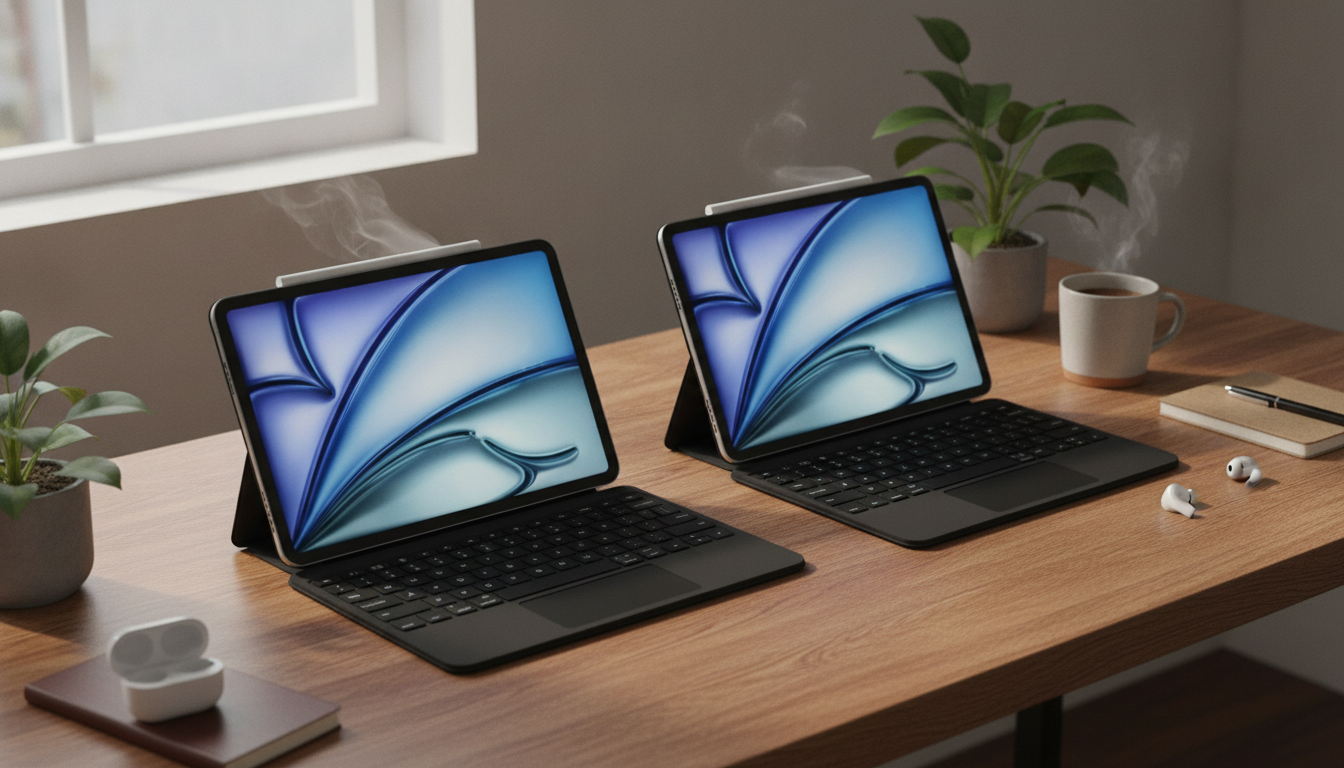
Magic Keyboard Case for iPad Air 6 (2024) and iPad Pro 11-inch: A Laptop-Style Setup Without the Bulk
A keyboard case can turn an iPad into a more capable tool for writing, study, and everyday work—without giving up the flexibility of a touchscreen tablet. A Magic Keyboard-style setup is especially appealing for iPad Air 6 (2024) and iPad Pro 11-inch users who want fast typing, a trackpad for precise control, and a stable stand-like design that opens and closes like a compact laptop.
Below is a practical breakdown of what matters most: who benefits, how to confirm the right fit, what makes typing feel better over long sessions, why the trackpad changes the workflow, and the carry-friendly details that tend to matter after the first week.
Who this keyboard case suits best
- Students and note-takers who type long documents, outlines, and research notes between classes.
- Remote workers who want a compact setup for email, docs, spreadsheets, and video calls.
- Creators who prefer quick shortcuts and precise cursor control for editing and selecting text.
- Travelers who want a stand + keyboard combined into one piece, reducing what needs to be carried.
- Multitaskers on iPadOS who want a trackpad to reduce constant screen tapping and speed up navigation.
Fit and compatibility: getting the right iPad model and size
The biggest frustration with any iPad keyboard case usually comes down to compatibility. “iPad Pro 11-inch” spans multiple generations, and small changes—like camera module shape, magnet placement, and connector alignment—can affect how securely the iPad docks and how cleanly the case closes.
- Confirm the exact iPad generation and screen size before buying; “iPad Pro 11-inch” can refer to multiple generations with small design differences.
- Check camera cutout alignment and edge fit; a close match helps keep the iPad stable when opening, closing, and typing.
- Verify magnet placement and attachment strength so the iPad stays aligned in both typing and viewing positions.
- If using an iPad Air 6 (2024), confirm that the case listing explicitly includes that model to avoid mismatched cutouts.
- If using a screen protector or thicker rear skin, expect slightly tighter tolerances when docking and closing.
Quick compatibility checklist before ordering
| Check item | What to confirm | Why it matters |
|---|---|---|
| Model name | iPad Air 6 (2024) or iPad Pro 11-inch (your generation) | Prevents misaligned fit and camera cutout issues |
| Keyboard connection | Magnetic/connector alignment and stable attachment | Avoids wobble and improves typing stability |
| Case closure | Closes fully with your screen protector (if used) | Protects screen in a bag and reduces key marks |
| Viewing angles | Supports comfortable angles for typing and media | Reduces neck strain and improves usability |
| Port access | Charging/USB-C opening and speaker cutouts | Ensures cables and audio aren’t blocked |
Typing feel and layout: what makes daily use comfortable
A laptop-style case should make long typing sessions feel easier, not merely “possible.” Two factors drive comfort: the keyboard’s feel and the physical stability of the case when pressure is applied repeatedly.
Trackpad and iPadOS gestures: why it changes the workflow
A trackpad isn’t just a convenience—it can change how quickly everyday tasks get done. Cursor precision helps with text selection, spreadsheets, and anything that requires fine control without covering the screen with your fingers. iPadOS also supports multi-touch trackpad gestures for navigation and app switching (see Apple’s guidance on using a trackpad with iPad: Apple Support).
Protection and carry: what a keyboard case should handle
Everyday setup tips for better comfort and battery management
Magic Keyboard Case for iPad Air 6 (2024) & iPad Pro 11 Inch: product overview
The Magic Keyboard Case for iPad Air 6 2024 & iPad Pro 11 Inch is built to deliver a laptop-style experience by combining a keyboard, trackpad-style navigation, and a protective case into one portable setup. It’s a practical option for writing, email, schoolwork, and iPadOS multitasking—especially when you want quick transitions between typing and touch without carrying multiple accessories.
At-a-glance details
| Item | Details |
|---|---|
| Product | Magic Keyboard Case for iPad Air 6 2024 & iPad Pro 11 Inch |
| Price | $81.51 USD |
| Availability | In stock |
| Product page | View product |
More in-stock accessories to round out your Apple setup
- Corduroy Fabric Strap for Apple Watch for a softer, casual feel.
- Milanese Magnetic Stainless Steel Band for Apple Watch for a cleaner, office-friendly look.
- Premium Leather Strap for Apple Watch for a classic style that pairs well with a minimalist carry kit.
Specs reference (helpful for confirming your exact model)
When matching a case to your iPad, model-year confirmation helps avoid small but annoying fit problems. Apple’s official technical specifications pages are a reliable place to verify the exact generation and hardware details: iPad Air (6th generation) technical specifications and iPad technical specifications (including iPad Pro 11-inch).
FAQ
Will this keyboard case fit all iPad Pro 11-inch generations?
No—“11-inch” covers several generations with small design changes. Match your exact model/year and confirm camera cutouts and connector alignment on the product page before ordering.
Does a trackpad work well on iPadOS for everyday tasks?
Yes. iPadOS supports cursor control and multi-touch gestures, which can make text editing, multitasking, and precision selection faster, though the experience can vary depending on each app’s level of support.
Is a keyboard case comfortable to use on a lap?
It can be, especially when the hinge is stable and the case has balanced weight. For lap use, a slightly steeper screen angle often reduces wobble and helps keep keystrokes consistent.














Leave a comment