Foldable Adjustable Stand for iPhone & iPad (4.7–11)
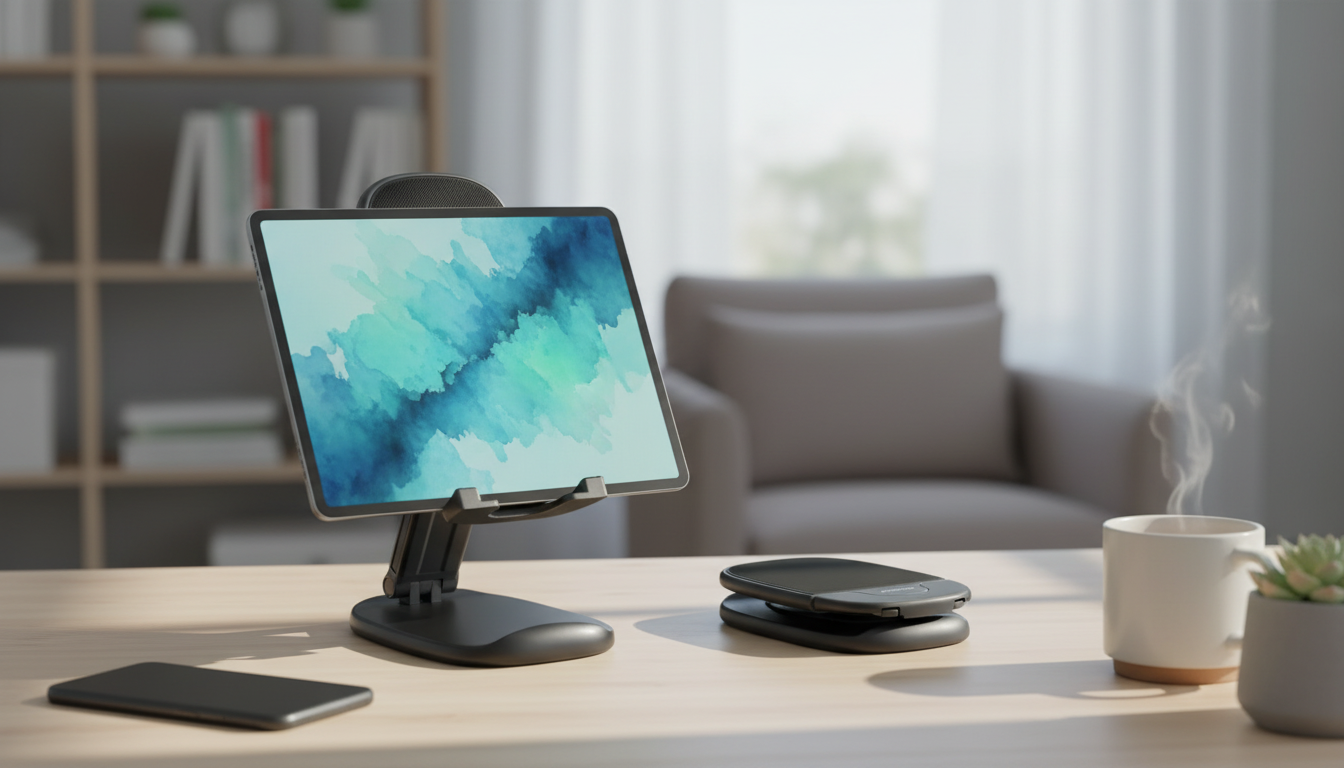
Adjustable Foldable Phone & Tablet Stand for Apple Devices (4.7″-11″)
A compact stand can make daily iPhone and iPad use more comfortable—whether it’s for FaceTime, streaming, reading recipes, or using a keyboard at a desk. This adjustable foldable stand supports Apple devices from 4.7″ to 11″, packs flat for travel, and helps keep screens at a stable viewing angle for hands-free use.
What It Solves in Everyday Apple Device Use
Phones and tablets get used everywhere: desks, couches, kitchen counters, nightstands, and airport seats. A foldable stand turns those moments into a more stable, easier-to-see setup.
- Keeps iPhone or iPad upright for calls, watching videos, or reading without holding the device
- Improves desk setup ergonomics by raising the screen closer to eye level (depending on angle and height settings)
- Reduces accidental tipping compared with propping a device against random objects
- Folds down for easy storage in a bag, drawer, or travel pouch
- Works for portrait or landscape orientation for messaging, browsing, or streaming
For general posture and comfort basics, Apple and workplace ergonomics guidance both emphasize keeping screens at a comfortable height and angle for your neck and shoulders. See Apple Support and the NIOSH ergonomics resources for foundational tips you can apply to a phone or tablet setup too.
Key Features to Look For in an Adjustable Foldable Stand
Not all stands feel the same in real use. The difference usually comes down to hinges, base stability, and how well the contact points protect your device.
- Angle adjustment: multiple hinge positions for comfortable viewing and reduced neck strain
- Stable base: a footprint that resists wobble during tapping and swiping
- Device protection: contact surfaces that help prevent scratches on cases or device edges
- Cable-friendly design: space to route a charging cable while the device stays on the stand
- Foldability: collapses without tools and fits into small spaces for commuting or travel
A good everyday test: set your device on the stand in landscape mode and tap a few on-screen controls. If the stand shifts, a lower angle and a flatter surface usually improve stability immediately.
Compatibility Guide for iPhone and iPad (4.7″-11″)
This adjustable foldable stand is designed for Apple devices within the 4.7″-11″ size range, which covers many iPhones and smaller iPads. It’s also handy for switching orientations quickly—portrait for calls and reading, landscape for streaming and presentations.
- Fits Apple devices within the stated size range, covering many iPhone models and smaller iPads
- Works well with typical protective cases; very thick cases may reduce how securely the device rests on the lip
- Supports landscape mode for video and portrait mode for calls and reading
- Best results come from centering the device on the stand and adjusting the angle gradually to avoid sudden shifts
Quick Compatibility Checks
| Apple device type | Typical use on a stand | What to confirm before buying |
|---|---|---|
| iPhone (within 4.7″-11″) | FaceTime, streaming, charging on desk | Bottom edge fits on the support lip; cable can route cleanly |
| iPad mini / smaller iPads (within 4.7″-11″) | Reading, notes, video calls | Stand remains stable when tapping; comfortable viewing angle |
| iPad with case or keyboard accessory | Desk work, browsing, videos | Case thickness doesn’t prevent the device from sitting flush |
Comfort and Setup: Getting the Best Viewing Angle
Adjustability matters most when you’re using your device for more than a quick glance. Small angle changes can reduce neck bend, glare, and the “chin-up” or “looking down” camera effect in calls.
- For video calls, set the device so the camera is near eye level to avoid unflattering low angles
- For long reading sessions, use a slightly higher angle to reduce looking down
- For typing on-screen, lower the angle a bit to keep tapping stable
- If the device wobbles, reduce the angle or move the stand to a flatter surface
- Keep the heaviest part of the device centered over the base to improve stability
If you use an external keyboard with an iPad, try placing the iPad on the stand and the keyboard directly in front. This helps separate “screen height” from “typing height,” which can feel more natural during longer sessions.
Where This Stand Fits: Home, Office, and Travel
A foldable stand earns its keep because it’s easy to move. Instead of having one fixed spot, it can follow your routine throughout the day.
Care, Safety, and Long-Term Durability Tips
Product Details and Purchase Option
- Product: Adjustable Foldable Phone & Tablet Stand for Apple Devices (4.7″-11″)
- Use case: hands-free support for iPhone and iPad in portrait or landscape orientation
- Value note: an inexpensive upgrade for daily comfort, calls, and viewing
FAQ
Will it hold an iPhone or iPad while charging?
In most cases, yes—foldable stands typically leave enough room to plug in a charging cable while the device rests on the support lip. Confirm the stand doesn’t block the charging port area and route the cable with a little slack so it doesn’t tug the device forward.
Does it work with a phone case or iPad case?
Most standard cases work fine, but very thick or unusually shaped cases can affect how securely the device sits against the stand’s contact points. For the best fit, center the device and adjust the angle slowly to keep the balance stable.
Is it stable enough for tapping and swiping?
Stability depends on the surface, the size/weight of your device, and the angle you choose. For heavier tapping, use a lower angle, place the stand on a flat surface, and keep the device centered over the base.













Leave a comment