Magnetic Desk Stand for iPhone & iPad: Stable, Tidy Setup
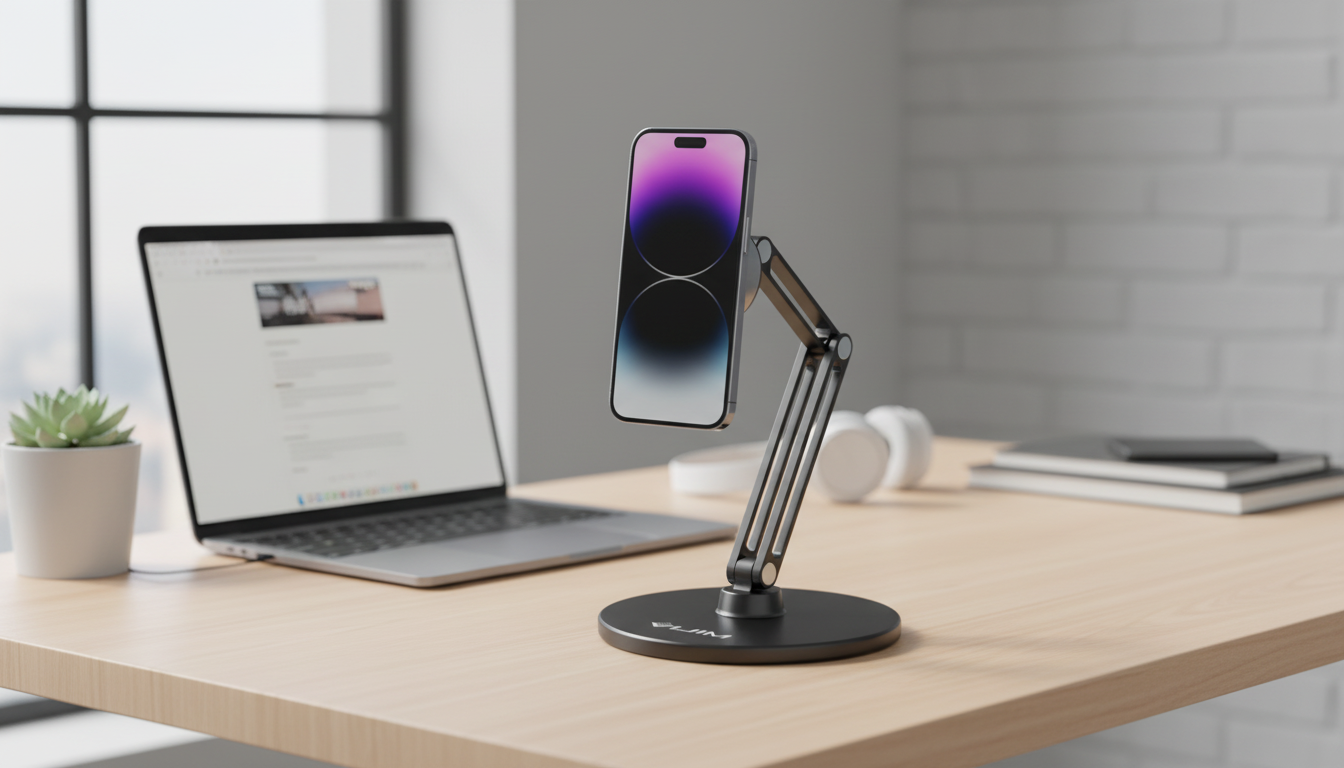
Magnetic Desk Phone & Tablet Holder Stand for Apple Devices
A magnetic desk stand can turn an iPhone or iPad into a stable, easy-to-view screen for calls, messages, streaming, and hands-free work. With a consistent viewing spot on your desk, you can keep devices within reach, maintain comfortable angles, and cut down on clutter—while still feeling confident the device will stay put during taps and swipes.
What This Magnetic Desk Stand Helps With
- Keeps an iPhone or iPad propped at a consistent height for video calls and notifications.
- Makes it easier to use Face ID, unlock, and glance at widgets without picking the device up repeatedly.
- Supports hands-free viewing for recipes, workouts, and streaming at the desk.
- Helps create a dedicated spot for devices to reduce misplacement and cable sprawl.
- Improves ergonomics by encouraging a more neutral neck position when positioned correctly.
If you bounce between email, messaging, and quick meetings, a “home base” stand reduces those small interruptions—like searching for your phone under papers or shifting an iPad around to avoid glare.
Magnetic Hold: Stability and Everyday Safety
Magnetic convenience only feels premium when it’s steady. For everyday use, magnet strength should resist sliding during touch input and prevent wobble when you’re scrolling, typing on-screen, or tapping through menus.
- Magnet strength: Should hold through normal tapping without drifting.
- Base stability: The base matters as much as the magnet—weight, footprint, and non-slip pads all help.
- Compatibility: Use a MagSafe-compatible case or a magnetic ring adapter when needed for a reliable hold.
- Wallet awareness: Avoid placing magnetic mounts right next to magnetic stripe cards; keep wallets and hotel keys a little distance away.
- Surface protection: A smooth coating or protective pad helps reduce the chance of scratches on cases.
| Test | What to look for | Why it matters |
|---|---|---|
| Tap test | Device doesn’t drift or swivel | Prevents accidental drops during use |
| Swipe test | Base stays planted on the desk | Reduces wobble and distraction |
| Angle test | Holds position without slipping | Maintains comfortable viewing angle |
| Cable test | Charging cable doesn’t pull device off-center | Keeps setup tidy and stable |
Using It With iPhone and iPad: Placement and Angle
Placement is what turns a stand from “nice” to “can’t-work-without-it.” A good rule is to position the screen slightly below eye level so you’re not lifting your chin or bending your neck forward for long sessions. General workstation ergonomics guidance (including monitor height and neutral posture) can be found through OSHA’s Computer Workstations eTool.
- For iPhone: A steeper angle often works best for FaceTime, quick notifications, and glanceable widgets.
- For iPad: A wider base and slightly lower angle can improve stability, especially for larger models.
- For frequent tapping or Apple Pencil use: Prioritize a low center of gravity and a sturdy hinge so the stand doesn’t bounce.
- Portrait vs. landscape: Rotate depending on the app—portrait for messages and calls, landscape for streaming, split-screen notes, or reference docs.
A small adjustment can make a big difference: if you notice yourself leaning in during calls, lower the stand a touch and bring it closer so your neck stays more relaxed.
Charging and Cable Management
A clean charging path keeps everything feeling effortless. When a cable is pulled too tight, it can torque the device off-center and create constant micro-wobbles while you work.
- Leave enough slack to adjust the viewing angle without stressing the connector.
- Route cables away from keyboard and mouse travel so you don’t snag them mid-task.
- If using MagSafe charging separately, confirm the stand doesn’t interfere with coil alignment or add extra spacing that weakens charging performance.
- For best battery health during extended desk sessions, avoid excessive heat buildup around the device.
For background on MagSafe behavior and supported accessories, Apple’s documentation is a helpful reference: Apple Support: About MagSafe on iPhone. For wireless charging fundamentals and the Qi standard, see the Wireless Power Consortium.
Who It’s Best For
- Remote workers: Keep the camera steady at a consistent, flattering angle for frequent calls.
- Students: Use an iPad for notes, references, and split-screen study sessions without constantly shifting it around.
- Creators: Maintain a stable device position for recording desk-level clips or overhead shots.
- Tidy-desk builders: Create a dedicated “parking spot” for devices to reduce clutter and misplacement.
- Shared spaces: Set up a common charging and viewing station for multiple Apple devices.
Product Snapshot
If you want a single stand that supports hands-free calls, reliable desk viewing, and a cleaner setup, the Magnetic Desk Phone & Tablet Holder Stand for Apple Devices is a straightforward option to anchor your daily routine.
At-a-glance details
Simple Setup Tips for a Cleaner Desk
To round out a coordinated Apple accessory setup, consider swapping bands to match your day: the Corduroy Fabric Strap for Apple Watch offers a casual texture, while the Milanese Magnetic Stainless Steel Band for Apple Watch leans more polished for office hours.
FAQ
Will a magnetic desk stand work if the iPhone case is not MagSafe-compatible?
It can, but the hold is usually weaker and less consistent. For the most reliable attachment, use a MagSafe-compatible case or add a magnetic ring adapter aligned to the phone’s magnetic area.
Is it safe to use magnets around iPhone and iPad devices?
Modern Apple devices are designed to work with magnetic accessories, including MagSafe. As a practical precaution, keep magnetic stripe cards, hotel keys, and similarly sensitive items a bit away from strong magnets.
Can it hold an iPad securely for tapping and scrolling?
It depends on the iPad size, the stand’s base weight, and the viewing angle. For better stability, use a lower angle, ensure the base is non-slip, and keep the iPad’s center of mass over the base.













Leave a comment