Waterproof iPad Sleeve for Air & Pro 11/13 + Accessories
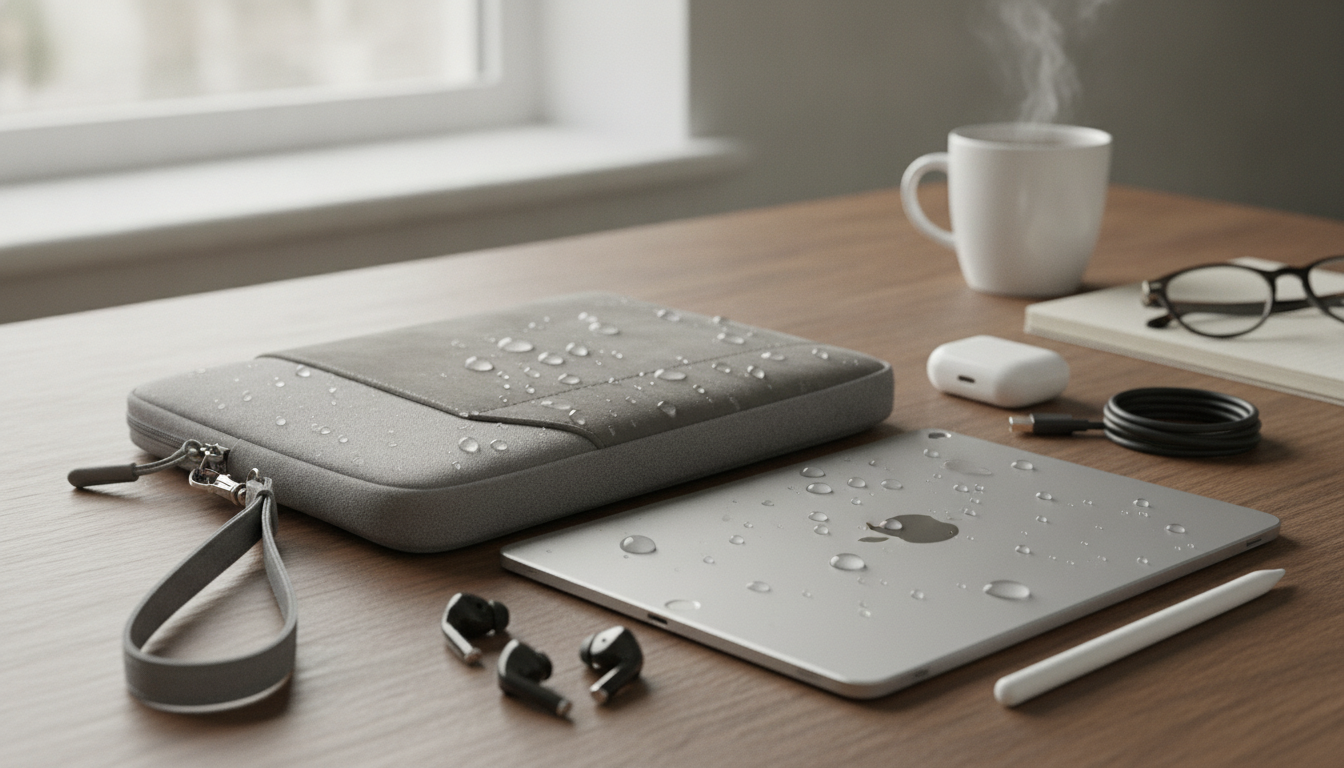
Waterproof Tablet Sleeve Case for iPad Air/Pro 11/13 and Accessories
A waterproof sleeve can be the difference between a minor spill and a ruined tablet—especially when commuting, traveling, or packing a bag with water bottles and chargers. A sleeve-style case adds a protective layer without turning your iPad into a brick, and it can also help keep your everyday carry neatly contained. The Waterproof Tablet Sleeve Case for iPad Air/Pro 11/13 and Accessories is built for iPad Air and iPad Pro 11/13-inch classes, with room to stash the small add-ons that tend to vanish in the bottom of a tote or backpack.
What This Sleeve Is Made to Do
A good sleeve is less about showing off and more about quietly preventing the problems that happen during real life: surprise rain, sweating water bottles, leaky hand sanitizer, and coffee-shop tables that aren’t as dry as they look.
- Adds a water-resistant barrier around an iPad to reduce risk from rain, splashes, and accidental bag leaks
- Provides a simple, lightweight alternative to bulky hard-shell cases when portability matters
- Keeps the tablet and small accessories together so the essentials can be carried as one kit
- Works well for daily carry: office commutes, classrooms, airports, coffee shops, and outdoor seating
For many people, a sleeve also becomes the “grab-and-go” layer: pull it from your backpack and you immediately have your iPad, charging basics, and a place to set everything down without worrying about a damp surface.
Fit and Compatibility for iPad Air and iPad Pro 11/13
“11-inch” and “13-inch” are useful categories, but the most reliable way to avoid a too-tight (or too-loose) fit is to confirm your iPad generation and compare dimensions. Apple publishes model measurements for iPad Air and iPad Pro, which you can reference directly: Apple iPad Pro Technical Specifications and Apple iPad Air Technical Specifications.
- Sized for iPad Air and iPad Pro in 11-inch and 13-inch classes; confirm your iPad generation and overall dimensions before purchase
- Consider whether a keyboard case, protective shell, or Apple Pencil grip will stay on the iPad while inside the sleeve—extra thickness can affect fit
- If the sleeve is used as a “quick-stow” option, leave a little room for easy insertion and removal; if used for travel protection, a snug fit helps prevent shifting
Quick fit check before ordering
| What to measure | Why it matters | Tip |
|---|---|---|
| iPad height and width | Ensures the device slides in without bending corners | Use Apple’s listed dimensions for your model, then compare to sleeve size guidance |
| Thickness with any case/keyboard | Extra bulk can prevent closure or strain seams | Test with your current setup: iPad + case + Pencil |
| Accessories you want inside | Cables and adapters can press against the screen | Place harder items (chargers) away from the display surface |
| Closure clearance | Overstuffing reduces water resistance | Aim for a comfortable close with no forced compression |
Water Protection: What to Expect (and What Not to)
A waterproof sleeve is best treated as everyday water resistance: it’s there for rain, splashes, and the “something leaked in my bag” scenario. Unless a sleeve explicitly lists an immersion rating, don’t assume it’s meant to be submerged.
- A waterproof sleeve is best treated as splash and rain protection, plus an added safeguard against minor liquid exposure in a bag
- Avoid deliberate submersion unless the product explicitly states an immersion rating; sleeve-style cases often focus on everyday water resistance
- Check seams, zipper/closure design, and fabric coating—these areas typically determine real-world protection
- After exposure to water, wipe the exterior dry before opening so droplets do not fall inside onto the tablet
If you like to compare water-resistance language across products, it helps to understand the IP rating system used for many electronics. While a sleeve may not carry an IP rating, the standard itself is a useful reference point: IEC 60529 IP Code (Ingress Protection) overview.
Storage for Accessories Without Scratching the Tablet
Carrying accessories in the same pouch as your iPad is convenient, but it’s also where avoidable wear can happen. The goal is simple: keep hard edges from pressing into the screen or corners during movement.
Best Use Cases: Commute, Campus, and Travel
Care and Longevity
Pairing Ideas: Accessories That Travel Well Together
If you like having a small “extras” pouch mindset, consider pairing your tablet setup with one of these easy-to-pack add-ons: the Corduroy Fabric Strap for Apple Watch for casual days, the milanese-magnetic-stainless-steel-band-for-apple-watch for a dressier option, or the premium-leather-strap-for-apple-watch-49mm-45mm-44mm-41mm-40mm when you want a classic look without packing something bulky.
FAQ
Will an iPad with a keyboard case fit inside a waterproof sleeve?
Often depends on the keyboard’s thickness and hinge bulk. Measure the iPad plus keyboard thickness and avoid forcing the closure; a snug-but-not-tight close is safer for seams and water resistance.
Is a waterproof sleeve safe for beach or pool days?
It’s a solid choice for splash protection and carrying to and from the water. Keep sand out, wipe the exterior before opening, and avoid submerging unless an immersion rating is explicitly provided.
Can chargers and adapters be stored in the same sleeve as the iPad?
Yes, but keep hard items from pressing into the screen by using a separate pocket/section when possible. Cable ties help prevent shifting during transit.













Leave a comment