Vertical Shoulder Bag for 15–16″ MacBook: Fit & Comfort

Vertical Shoulder Carry for 15–16″ MacBook: A Practical Everyday Bag
A vertical shoulder bag is a smart match for a larger MacBook because it keeps the laptop close to your body, stays easier to control in tight spaces, and transitions cleanly from commute to meeting. When the laptop rides upright, the bag’s footprint stays slim, so you can move through doorways, train aisles, and elevators with fewer bumps and less awkward swinging. Below are the key fit, protection, organization, and comfort details to look for—plus a quick checklist to confirm the bag truly suits a 15–16 inch MacBook Air or MacBook Pro.
Why a vertical laptop bag works for bigger MacBooks
- Narrower profile against the torso: A vertical shape tends to stay tucked in, reducing accidental contact with seats, turnstiles, and fellow commuters.
- Faster grab-and-go handling: For short walks, rideshares, and quick office entry, it’s easy to lift a vertical bag by the handle or slide it forward to access pockets.
- Balanced carry with the right strap length: When adjusted so the bag sits around mid-torso, the weight stays centered and stable rather than bouncing at the hip.
- Polished look: Upright bags typically read more streamlined than bulky messengers, pairing well with business casual, airport fits, and daily streetwear.
Fit and sizing checks before buying
MacBook sizing can be deceptively close—especially between 15-inch and 16-inch models—so the bag should be built for that range, not merely “capable” on paper. Before committing, confirm the laptop compartment is sized for 15–16 inch devices and has structure to keep the computer upright without shifting.
- Compartment designed for 15–16 inches: Look for a dedicated sleeve or main section intended for larger laptops, not a loose “up to 16″” claim with no shape.
- Room for a thin case/skin: A snug fit is good; a zipper that strains at the corners is not. Allow a little clearance if you use a shell case.
- Closure that won’t snag corners: Smooth zipper tracks and a wide opening help you insert/remove a large MacBook without catching edges.
- Padded, upright laptop hold: The sleeve should keep the laptop vertical so it doesn’t slide sideways and load pressure onto one corner.
Quick fit checklist for a 15–16″ MacBook
| What to check | Why it matters | What “good” looks like |
|---|---|---|
| Laptop compartment padding | Helps reduce impact from drops and bumps | Padding on both sides with a structured feel |
| Interior space | Prevents pressure on corners and screen | Laptop slides in/out smoothly without forcing the zipper |
| Bottom support | Protects edges when setting the bag down | Reinforced base or cushioning at the bottom |
| Strap adjustment range | Improves stability and comfort | Sits close to body; doesn’t swing when walking |
| Accessory room | Avoids overstuffing the laptop compartment | Separate pockets for charger, cables, and small items |
If you’re unsure which MacBook model you have, Apple’s official identifiers can help you confirm your exact size before shopping: Apple Support — Identify your MacBook Pro model and Apple Support — Identify your MacBook Air model.
Protection features that matter day to day
For a laptop you carry daily, protection isn’t only about thick padding—it’s also about how the bag holds shape, how it lands when set down, and how well it prevents small items from rubbing against the aluminum finish.
- Padded walls + structured frame: Helps the bag resist flexing when pressed in a crowded train or packed under an airplane seat.
- Reinforced base: A sturdier bottom reduces wear from repeated set-downs on pavement, office floors, and café surfaces.
- Secure closures: Smooth, reliable zippers (or a firm flap fastener) help prevent accidental spills when you’re moving quickly.
- Soft interior lining: Minimizes cosmetic scuffs, especially if you slide the laptop in and out multiple times a day.
Organization and capacity for work essentials
A vertical laptop shoulder bag works best when the laptop compartment stays “clean” and accessories live in their own spaces. Good organization also helps you avoid the classic overstuffing problem—where a charger bulges into the laptop sleeve and adds pressure to the screen.
Comfort and carry options
Care and long-term durability tips
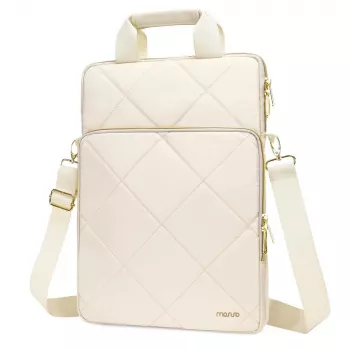
Product pick: Vertical Laptop Shoulder Bag for MacBook Air Pro 15–16 Inch
If you want the vertical carry style without moving up to a full backpack, the Vertical Laptop Shoulder Bag for MacBook Air Pro 15-16 Inch is built around the needs of larger MacBook sizes in the 15–16 inch range. It’s a straightforward everyday option when a slim, upright profile is the priority—useful for commuting with your laptop, charger, and small essentials while keeping everything more controlled than a wide messenger.
Optional add-ons for a coordinated everyday carry
FAQ
Will a 16-inch MacBook Pro fit safely in a vertical shoulder bag?
Yes if the laptop compartment is designed for 15–16 inch devices, has padding, and the zipper or closure doesn’t press on the corners. Confirm the compartment size and leave a little extra room if you use a slim case.
Is a vertical laptop bag comfortable for commuting?
It can be very comfortable when the strap is adjustable, wide enough to distribute weight, and the bag sits close to your torso to reduce swinging. Keeping accessories in separate pockets also helps prevent an uneven load.
What should be kept out of the laptop compartment?
Avoid hard or sharp items like chargers, hubs, and keys in the same compartment as the laptop. Use separate pockets so the laptop surface and screen aren’t exposed to scuffs or pressure points.













Leave a comment