60-Inch L-Shaped Farmhouse Desk with Drawers & Charging
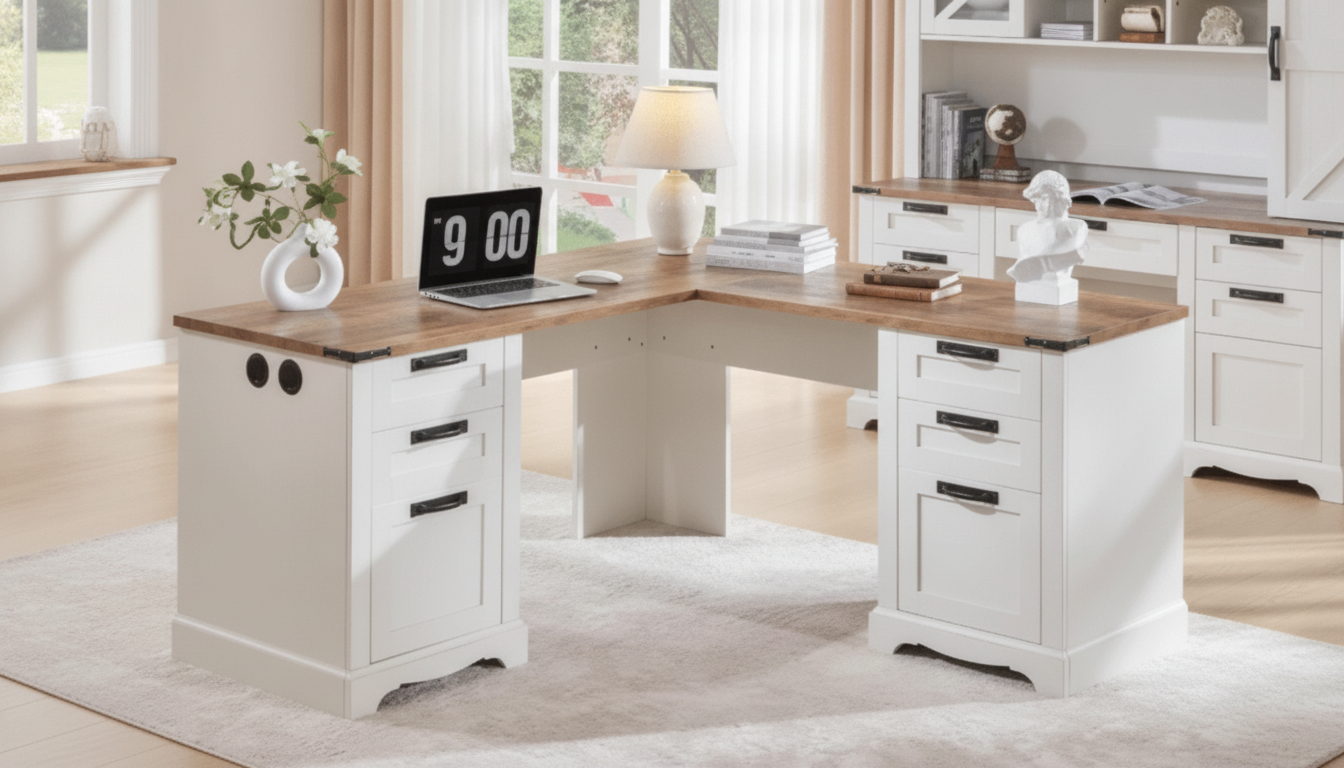
60″ L-Shaped Farmhouse Executive Desk with Drawers and Charging Station
A well-planned workspace needs room to spread out, reliable power within reach, and storage that keeps daily tools close but clutter out of sight. This 60″ L-shaped farmhouse executive desk combines an expansive corner-friendly surface, built-in charging access, and drawer storage to support focused work, study, and home office routines in a warm, rustic-inspired look.
What makes this L-shaped executive desk different
- 60″ L-shaped footprint designed to use a corner efficiently while still feeling like a full-size desk.
- Farmhouse-inspired styling that pairs a homey look with an executive-style working area.
- Integrated charging station concept to reduce cable sprawl and keep devices powered where they’re used.
- Drawer storage to separate work essentials (paper, accessories, tech) from the main desktop.
- Built for multitasking: monitor + laptop, printer + paperwork, or writing + crafting zones.
At-a-glance features and who they help
Use this quick map to match features to common workspace needs (schoolwork, WFH, gaming setup, or a shared home office).
| Feature | Why it matters | Best for |
|---|---|---|
| L-shaped 60″ surface | Creates two working zones without needing two separate desks | Multitaskers, dual-monitor users, corner offices |
| Charging station | Keeps power accessible on the desktop and reduces reaching behind furniture | Laptop + phone users, students, creators |
| Built-in drawers | Stores supplies close at hand and supports a cleaner desktop | Paperwork-heavy roles, shared workspaces |
| Executive-style layout | Feels substantial and stable for long sessions | Remote work, dedicated home offices |
| Farmhouse look | Blends with cozy, rustic, and transitional rooms | Home offices that double as guest rooms or living spaces |
Planning the layout: right-hand vs left-hand return
- Pick your primary zone: decide which side should hold the longer work area (main monitor, keyboard, and mouse) and which side becomes the secondary zone (writing, printer, or docking space).
- Measure beyond the corner: confirm both wall lengths, but also chair movement and a comfortable walkway so the space doesn’t feel pinched.
- Check drawer swing: allow room for drawers to open fully without tapping a wall, cabinet, or radiator.
- Place power where you “land” devices: set the charging station side where your phone, headset, or tablet naturally ends up—so cords don’t cross the main work surface.
- Plan the rear view: for open-room placement, map cable routing (cord clips, an under-desk tray, or a mounted power strip) for a tidy look from every angle.
Charging station setup for a cleaner desktop
- Create a predictable “power zone” by grouping high-use devices (laptop charger, phone cable, desk lamp) in the charging area instead of scattering adapters across the desk.
- Use shorter cables for frequently charged devices to prevent loose loops from draping into drawers or across a writing area.
- Keep adapters ventilated: avoid stacking power bricks tightly together so heat can dissipate during long work sessions.
- Label shared cables (work vs personal) so someone doesn’t unplug the wrong device right before a meeting.
For general home electrical safety practices—like avoiding overloaded outlets and damaged cords—review guidance from NFPA Electrical Safety in the Home.
Drawer organization that stays functional
- Sort by frequency: daily-use items in the easiest-to-reach drawer; reference items in lower or farther drawers.
- Use shallow organizers for small accessories (USB drives, batteries, staples) to keep everything visible and prevent “junk-drawer creep.”
- Make one drawer the “charging accessories” hub for spare cords, adapters, and batteries to keep the desktop minimal.
- Set up a paper zone: one drawer for active projects, another for archived documents (or use labeled folders to separate categories).
Comfort and posture: making a large desk work for long sessions
- Center your main screen directly in front of your chair and reserve the return side for secondary tasks to reduce repeated twisting.
- Keep the “reach zone” tight: place the most-used tools (mouse, notebook, water, headset) within easy reach so shoulders stay relaxed.
- Protect a clear work area for mousing and writing—avoid working on top of cables, chargers, and stacked accessories.
- Consider a monitor riser or arm to bring screens to a comfortable height and free up surface space.
Ergonomic setup details and workstation component guidance can be cross-checked with OSHA’s Computer Workstations eTool and resources from Cornell University Ergonomics.
Assembly and everyday care
- Pre-sort hardware before starting, and identify left/right components early to avoid backtracking later.
- Tighten gradually: snug fasteners evenly, confirm alignment across the frame, then do a final tighten.
- Improve stability with felt pads under legs (especially on hard floors) and keep heavy items centered where possible.
- Clean gently: wipe spills quickly and use a mild cleaner; skip harsh abrasives that can dull finishes over time.
Who this desk fits best (and when to choose another setup)
In-stock picks to complete your workspace
- 60″ L-Shaped Farmhouse Executive Desk with Drawers and Charging Station
- Corduroy Fabric Strap for Apple Watch
- milanese-magnetic-stainless-steel-band-for-apple-watch
FAQ
How much space is needed for a 60″ L-shaped desk to feel comfortable?
Measure both wall lengths for the corner, then add room for your chair to roll back and for a clear walkway behind you. Also confirm drawers can open fully and that monitor depth plus cable routing won’t push the desk too far into the room.
Is it safe to leave devices plugged into the desk’s charging station all day?
It can be safe when you avoid overloading the station, use quality chargers, keep power bricks ventilated, and don’t daisy-chain power strips. Unplug unused devices and follow the manufacturer’s electrical ratings for the safest everyday use.
What’s the best way to organize drawers so the desktop stays clear?
Assign drawers by how often you use items (daily vs occasional), and use small trays so accessories stay visible and contained. Keep one drawer for charging extras and use folders to separate active papers from archived documents.













Leave a comment