Clear iPad Case with Pencil Holder: Slim, Drop-Ready
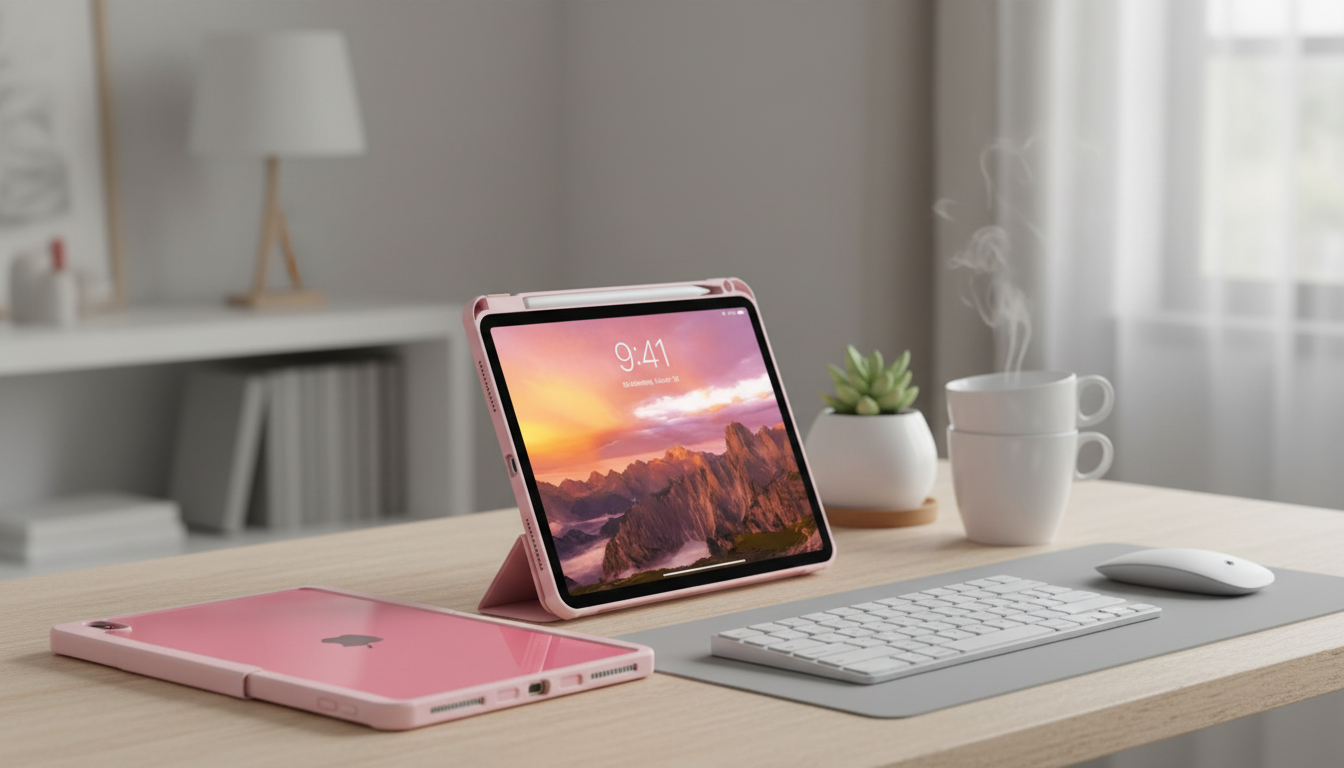
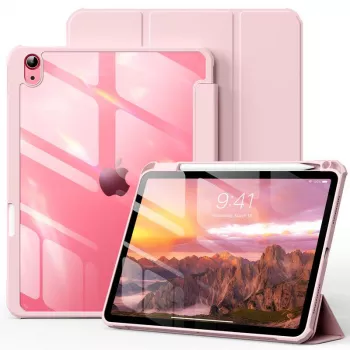
Protective iPad Case with Pencil Holder and Clear Back for Apple iPad
A sturdy iPad case should do three things well: protect against everyday drops and scuffs, keep the Apple Pencil secure, and still let the iPad’s design show through. This style combines a protective frame with a clear back and a dedicated pencil holder for a clean, practical setup at school, work, or travel.
If you want a simple, functional option, the Protective iPad Case with Pencil Holder and Clear Back for Apple iPad is designed around those priorities: impact-focused edges, scratch shielding, and always-there Pencil storage.
What This Case Is Designed to Solve
- Reduces damage from common knocks, desk drops, and bag-to-bag friction.
- Keeps the Apple Pencil from getting lost by storing it along the edge of the case.
- Shows the iPad’s color and engravings through a transparent back panel.
- Adds grip and structure without turning the iPad into a bulky brick.
Protection Where iPads Usually Take Hits
Most iPad damage happens in predictable places: corners, edges, and the back panel that rubs against grit on desks and in bags. A protective case built with a bumper-style frame targets those weak points without making the device feel oversized.
- Raised edges help keep the screen and camera area off flat surfaces, reducing scuffs from sliding across tables.
- Reinforced corners are the most important zones for accidental drops, where impact typically concentrates.
- A snug frame helps absorb shock and can reduce edge chipping when the iPad bumps a chair leg or countertop.
- Full-coverage back protection reduces scratches from sand, crumbs, and dust that collect in backpacks and tote bags.
For cleaning and day-to-day care basics, Apple’s guidance on safe materials and methods is a helpful reference: Apple Support: Clean your Apple products.
Pencil Holder Benefits for Everyday Carry
An Apple Pencil is easiest to use when it’s always in the same place. A dedicated holder along the case edge helps turn the iPad into a grab-and-go note-taking setup.
- Dedicated holder prevents the stylus from sliding around inside backpacks and totes.
- Convenient storage supports quick note-taking and sketching without searching for the Pencil.
- Helps avoid bent tips or cosmetic damage caused by loose storage with chargers, keys, and cables.
- Good for students, meeting notes, annotation, and creative work on the go.
If your workflow includes frequent annotations, a Pencil holder is also a time-saver: fewer “where did I put it” moments, and less chance of leaving it on a classroom desk or conference table.
Clear Back: Show the iPad, Not the Wear
A clear back is ideal when you like the look of your iPad as-is, but want everyday scratch protection. It’s also practical for shared environments where devices can get mixed up.
- Transparent back keeps the iPad’s original look visible while shielding from scratches.
- Easier to identify shared devices in classrooms or offices (especially with engravings or stickers).
- A clear back pairs well with different front cover colors and desk setups.
- Wipes clean quickly after daily handling.
Clear surfaces can show fingerprints more quickly than matte finishes, but they’re also easy to refresh with a microfiber cloth during the day.
Fit and Compatibility Checklist Before Buying
iPads with the same screen size can still have different camera bumps, speaker layouts, and button placement across generations. A great case fit depends on matching the exact model.
- Match the case to the exact iPad model name and screen size (different generations have different camera and button layouts).
- Confirm cutouts align with speakers, charging port, microphone, and camera.
- If using a keyboard, check whether the case adds thickness that affects magnetic attachment or connector alignment.
- If using Apple Pencil, confirm the holder placement is comfortable for right- or left-handed grabbing.
Quick Feature Checklist
| Feature | Why it matters | What to check |
|---|---|---|
| Corner protection | Most drops land on corners | Look for reinforced bumper corners and a snug frame |
| Raised screen edge | Reduces screen-to-table contact | Front lip higher than the glass |
| Clear back panel | Shows the device while preventing scratches | Transparency and scratch resistance after wiping |
| Pencil holder | Prevents losing the stylus | Secure fit; easy one-handed removal |
| Port and speaker cutouts | Avoids muffled sound and charging issues | Accurate openings for your iPad generation |
To confirm the exact model before ordering, Apple’s official guide is the most reliable starting point: Apple Support: Identify your iPad model.
Daily Use: Handling, Grip, and Desk Comfort
- A grippy edge helps reduce slips when carrying the iPad one-handed between classes or rooms.
- Protective frames can improve stability when the iPad is used on a lap or couch.
- For frequent typing, a slimmer protective profile tends to feel better than heavy rugged shells.
- Clear backs can pick up fingerprints—keeping a small microfiber cloth nearby helps.
Care and Cleaning Tips
Who This Style Works Best For
Related Accessories to Round Out the Setup
- Corduroy Fabric Strap for Apple Watch
- Milanese Magnetic Stainless Steel Band for Apple Watch
- Premium Leather Strap for Apple Watch (49mm/45mm/44mm/41mm/40mm)
FAQ
Will the pencil holder interfere with charging or pairing the Apple Pencil?
It depends on your iPad and Apple Pencil generation. Some Pencils charge magnetically on the side, while others charge via a connector or cable, so it’s important to confirm compatibility between your iPad model and Pencil type before buying.
Does a clear back turn yellow over time?
Some clear materials can yellow gradually with exposure to sunlight, heat, and skin oils. Gentle cleaning, avoiding harsh chemicals, and storing the device out of direct sun can help maintain clarity longer.
How can the correct iPad model be verified before ordering a case?
Check your iPad model in Settings by going to General > About and matching the model identifier to the correct generation. Verifying the exact model helps ensure the camera, button, and port cutouts align properly.













Leave a comment