Apple Pencil Silicone Sleeve: Better Grip, Less Slip
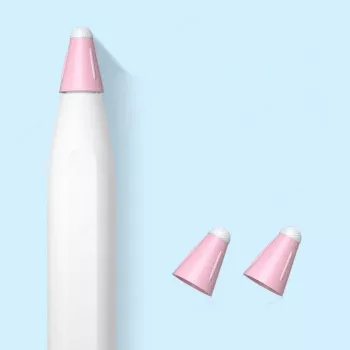
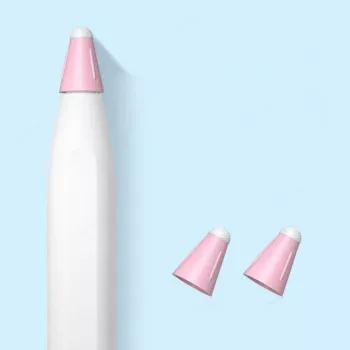
Soft Silicone Case for Apple Pencil: Grip, Protection, and Everyday Comfort
A slim silicone sleeve can make an Apple Pencil easier to hold, less slippery during long note-taking sessions, and better protected from scuffs. A good sleeve doesn’t change how the tip writes, but it can change how confidently you handle the stylus day after day—especially when you’re moving between classes, meetings, and workspaces.
Below is a practical breakdown of what a soft silicone case improves in daily use, what to verify before buying, and how to keep a sleeve clean so it stays comfortable over time.
What a Soft Silicone Case Changes Day to Day
Adding silicone is a small upgrade that tends to show up most during the “in-between” moments—when your hands are dry, you’re rushing, or you’re working on a smooth desk.
- More tactile grip: Silicone adds friction so the Pencil feels less slick during fast sketching, classroom notes, or commuting.
- Buffers minor impacts: It helps soften little bumps and prevents cosmetic scratches from keys, zippers, and desk edges.
- Less finger fatigue for some users: A slightly thicker diameter can feel more like a traditional pen, reducing the need to pinch tightly.
- Less rolling on tables: The added surface grip can keep the Pencil from sliding or rolling away on smooth surfaces.
- A low-cost “wear layer”: Instead of the stylus body taking every scuff, the sleeve takes the abuse and can be replaced cheaply.
Fit and Compatibility Checks Before Buying
Fit matters more than most people expect. A sleeve that twists, creeps toward the nib, or blocks charging can turn a helpful accessory into daily friction.
- Confirm your Apple Pencil generation: Different versions have different dimensions and charging methods, so model-specific fit is key.
- Charging and pairing method: If your Pencil attaches magnetically and charges wirelessly, the sleeve must be thin enough or have a dedicated cutout so it doesn’t break the connection.
- Snug tip-end opening: A well-shaped opening near the nib helps keep the sleeve from sliding forward while writing.
- If there’s a nib cap/cover: Make sure it doesn’t interfere with your writing angle or how you store the Pencil.
- Check storage fit after adding silicone: Folio loops and dock-style holders may become too tight once the outer diameter increases.
Quick Compatibility Checklist
| Check | Why it matters | What to look for |
|---|---|---|
| Apple Pencil generation | Different dimensions and charging styles | Case explicitly lists your Pencil model |
| Magnetic attachment/charging | A bulky sleeve can block charging | Thin profile or charging cutout |
| Tip clearance | Prevents drag and wobble | Precision cut around the nib area |
| Grip texture | Affects control and comfort | Matte or lightly textured silicone |
| Storage method | Sleeve changes how it fits in bags/loops | Measured thickness or user photos |
Comfort and Control: Grip Texture, Thickness, and Weight
Not all silicone feels the same. The texture and thickness you choose can make the Pencil feel “locked in” or, if the material is too soft, slightly squishy.
- Matte vs. glossy: Matte silicone tends to feel less slippery than glossy finishes, especially with dry hands or in air-conditioned rooms.
- Thickness changes the feel: Extra thickness can improve comfort during long sessions, but it may reduce that slim, pencil-like profile some people prefer.
- Softness vs. cleanliness: Very soft silicone can feel cushy, but it may attract dust and lint more easily; a balanced firmness often stays cleaner.
- Ergonomic details: A subtle ridge or contour can help keep your grip consistent without squeezing harder.
- Gestures and controls: If your Apple Pencil supports tap gestures or has flat-sided alignment, the sleeve should preserve access and orientation.
For Apple Pencil charging and pairing behavior by model, Apple’s guides are useful references: Apple Support — Charge Apple Pencil and Apple Support — Use Apple Pencil with iPad.
Protection: What Silicone Helps With (and What It Doesn’t)
Silicone is best thought of as everyday abrasion protection—not a rugged travel shell.
Care and Maintenance for a Clean, Grippy Sleeve
Product Pick: Soft Silicone Case for Apple Pencil
If the main goal is better grip and fewer everyday scuffs without adding bulk, a simple sleeve is often the most practical choice. The Soft Silicone Case for Apple Pencil is a lightweight add-on that suits students, designers, and anyone who regularly tosses the Pencil into a bag or pocket.
At-a-Glance
| Item | Price | Availability |
|---|---|---|
| Soft Silicone Case for Apple Pencil | $2.32 | In stock |
Pairing Ideas: Matching Accessories for a Cohesive Setup
- Soft, casual pairing: Match a grippy Pencil sleeve with the Corduroy Fabric Strap for Apple Watch for a relaxed, tactile feel that stays comfortable all day.
- Clean, durable look: If you prefer a sleeker, more structured finish, pair your setup with the Milanese Magnetic Stainless Steel Band for Apple Watch.
- Classic option: For a traditional style, the Premium Leather Strap for Apple Watch adds a warm, everyday look that complements neutral accessories.
FAQ
Will a silicone sleeve affect magnetic charging on an iPad?
It can. Thicker sleeves may weaken the magnetic connection or prevent wireless charging, so it’s best to use a model-specific sleeve that’s thin enough or includes a charging cutout, and expect some variability by iPad and Apple Pencil generation.
Does a silicone case make handwriting or drawing less precise?
Precision is typically unchanged because the nib still contacts the screen the same way. What can feel different is control due to added thickness or texture, so a slimmer sleeve is usually better for very fine-line work if the grip feels unfamiliar.
How should a silicone Apple Pencil sleeve be cleaned?
Wash it with mild soap and water, rinse thoroughly, and let it dry completely before reinstalling. Avoid alcohol or harsh solvents, and remove lint with a damp microfiber cloth while checking occasionally for stretching near openings.













Leave a comment