Apple Watch Ultra 2 Glass Protector + Metal Bumper
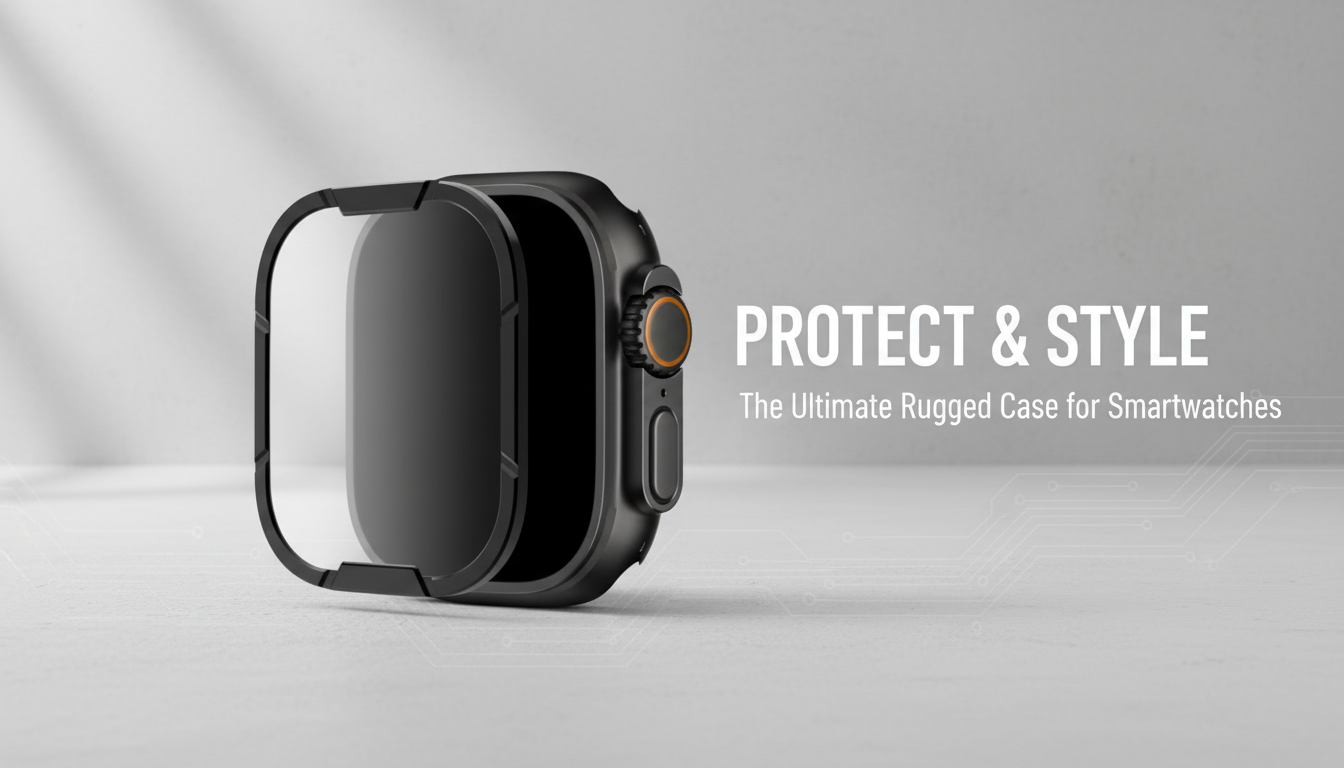
Tempered Glass Screen Protector & Metal Bumper for Apple Watch Ultra 2
A rugged watch deserves protection that doesn’t get in the way. A tempered glass screen shield paired with a metal bumper helps reduce the risk of scratches, scuffs, and edge impacts while keeping the display clear and responsive for workouts, travel, and everyday wear. For Apple Watch Ultra 2 owners who use their watch like a tool—not just an accessory—this two-part setup adds practical, targeted defense where damage most often starts: the screen surface and the outer edges.
What This Protector Set Adds to Apple Watch Ultra 2
- Combines two defenses: a hard glass layer over the display and a metal frame around the case edges.
- Designed for everyday knocks—door frames, gym equipment, desk edges—where corners take the hit.
- Aims to preserve clarity and touch response while adding a tougher exterior feel.
- Useful for outdoor use where dust, grit, and accidental bumps are more common.
If you’re ready to outfit your watch, the Tempered Glass Screen Protector & Metal Bumper for Apple Watch Ultra 2 is a straightforward way to add daily-impact coverage without turning the watch into a bulky “case-in-a-case.”
Key Benefits at a Glance
- Screen clarity: tempered glass helps keep the viewing experience crisp while reducing fine scratches.
- Impact management: a bumper can take the first contact on side hits and help prevent case scuffs.
- Confidence during activity: helpful for hiking, travel, work sites, gym training, and daily commuting.
- A cleaner look: a metal bumper can visually frame the screen and hide minor edge wear over time.
Protection Overview
| Area | Common risks | How the set helps |
|---|---|---|
| Display | Micro-scratches, scuffs, small direct impacts | Tempered glass creates a sacrificial layer over the screen |
| Edges & corners | Dings from drops and bumps, scraping against hard surfaces | Metal bumper absorbs contact and reduces direct case abrasion |
| Everyday handling | Keys/coins in pockets, desk grit, gym equipment contact | Hard outer surfaces help resist light-to-moderate wear |
| Appearance over time | Visible case marks, hazing from frequent contact | Bumper helps keep the case looking newer; glass protects the primary viewing area |
Fit and Compatibility Notes
- Confirm the watch model and size before ordering to ensure the bumper aligns with the Ultra 2 case shape and buttons.
- Check that the protector does not interfere with Digital Crown rotation and side button presses.
- If using a charging dock or tight-fitting stand, verify the bumper’s edges do not block proper seating.
- For frequent swimmers or beach use, plan for extra cleaning to remove salt/sand from seams.
Ultra-series watches are built to handle the elements, but add-ons can change how the watch sits in certain stands or mounts. A quick test fit—especially with charging accessories—can prevent day-to-day annoyances.
Installation: Getting a Smooth, Bubble-Minimized Finish
- Clean the screen thoroughly and remove oils; even tiny dust specks can create lift points under glass.
- Align carefully before pressing down; once seated, apply pressure from the center outward to push air out.
- Fit the bumper after the glass is secure so the frame doesn’t shift the protector’s edges during placement.
- Recheck button access and crown movement immediately after installation.
For best results, install in a low-dust environment and take your time with alignment. If you ever need official guidance on safe cleaning methods before applying accessories, Apple’s instructions are a reliable reference: How to clean your Apple Watch.
Daily Use: Touch Response, Visibility, and Controls
Care and Cleaning for Long-Lasting Protection
Water and sweat don’t automatically ruin a protector setup, but trapped salt or grit can. If you swim, surf, or spend time in sandy areas, it’s worth reviewing Apple’s notes on water exposure and care: About water resistance of Apple Watch.
Pairing with Bands for Different Looks
- Corduroy Fabric Strap for Apple Watch for casual comfort and an easy, everyday feel.
- Milanese Magnetic Stainless Steel Band for Apple Watch for a cleaner, more metallic look that pairs naturally with a bumper.
- Premium Leather Strap for Apple Watch for office-ready styling with a bit more polish.
When a Protector Set Makes the Most Sense
Apple Watch Ultra 2 is built for durability, but daily wear still adds up. A glass-and-bumper combination is a practical compromise: you keep the watch’s premium look and readability while adding a buffer for the moments you can’t predict—like a quick brush against a concrete wall or a bump on a metal rack at the gym. For additional tips on features and controls (especially if you’re checking crown/button clearance after installing a bumper), Apple’s official guide is helpful: Apple Watch User Guide (Apple Watch Ultra models).
FAQ
Will a tempered glass protector affect touch sensitivity on Apple Watch Ultra 2?
Quality tempered glass is made to preserve normal tapping and swiping, so touch sensitivity should feel the same in daily use. If responsiveness feels off, it’s usually due to dust, oils, or misalignment during installation—cleaning and reapplying often resolves it.
Does a metal bumper interfere with the Digital Crown, buttons, or charging?
A properly designed bumper should keep cutouts clear so the Digital Crown rotates freely and buttons press normally. It’s still smart to test crown rotation, button feel, and fit on your charging stand right after installation.
How should the watch be cleaned after workouts or swimming while using a bumper and screen protector?
Follow Apple’s cleaning recommendations, then dry thoroughly and wipe around the bumper edges to remove sweat, salt, or sand. Occasional removal of the bumper for a deeper clean can help prevent trapped grit from causing abrasion over time.














Leave a comment