Adjustable iPad Stand: Aluminum Alloy Comfort & Stability
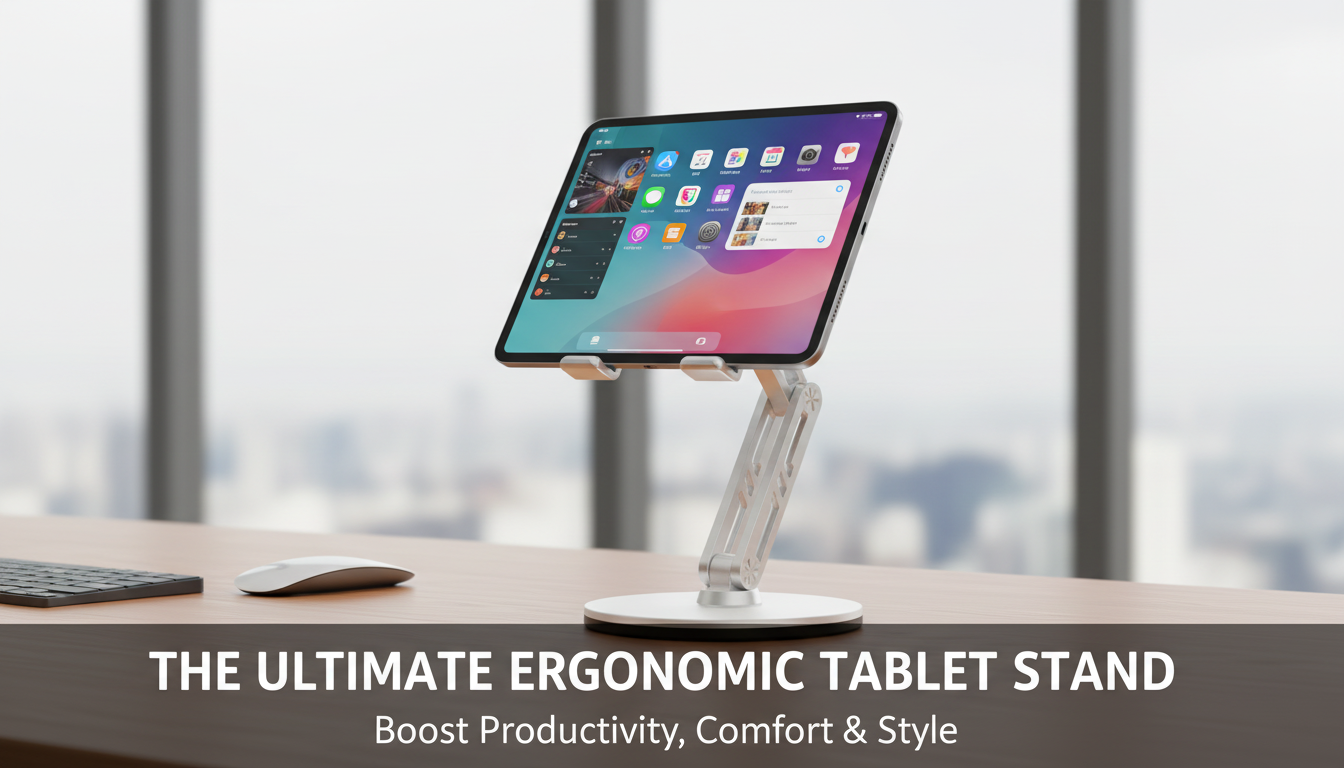
Adjustable Aluminum Alloy Tablet Stand for iPad: Comfortable Viewing for Work, Study, and Streaming
A sturdy tablet stand can make an iPad easier to use for video calls, reading, drawing, and watching content—while helping reduce neck strain and keeping a desk uncluttered. An adjustable aluminum alloy stand supports practical viewing angles and heights, creating a stable, modern setup that works at home, in the office, or on the go. Instead of constantly propping your iPad against books or a mug (and dealing with slips), a purpose-built stand keeps the screen where you need it, when you need it.
What This Tablet Stand Helps With Day to Day
Small upgrades to a workspace often have the biggest impact. A tablet stand is one of those upgrades because it changes how your body interacts with the screen—especially during longer sessions.
- Improves posture by raising the screen closer to eye level for longer sessions.
- Creates a steadier surface for tapping, scrolling, and light note-taking.
- Keeps the iPad accessible for recipes, workouts, meetings, and streaming.
- Frees up desk space by organizing the viewing area and cable routing.
- Supports quick angle changes between typing, watching, and drawing.
Key Features That Matter in an Adjustable Aluminum Stand
Not all stands feel the same in daily use. Stability, adjustability, and surface protection tend to be the difference between a stand you rely on and one that stays in a drawer.
- Adjustable tilt and viewing angle to reduce glare and match seated or standing use.
- Aluminum alloy body for a balance of strength, weight, and heat dissipation.
- Anti-slip pads and contact points to help protect the iPad and prevent sliding.
- Wide, stable base to reduce wobble during tapping and video calls.
- Foldable or compact-friendly profile for moving between rooms or packing in a bag.
For general workstation comfort guidance, Apple’s ergonomics recommendations are a useful reference point, especially for screen height and body positioning: Apple Support: Ergonomics. For broader desk setup and posture best practices, the NIOSH Computer Workstations eTool is another authoritative resource.
Quick Specs and Purchase Snapshot
If you’re looking for a simple, stable upgrade to your iPad setup, the Adjustable Aluminum Alloy Tablet Stand for iPad is currently available and priced for everyday use—without overcomplicating your desk.
| Item | Detail |
|---|---|
| Product page | https://grandofferhall.shop/adjustable-aluminum-alloy-tablet-stand-for-ipad/ |
| Price | 31.67 USD |
| Stock status | In stock |
| Material | Aluminum alloy (body) |
| Best for | Desk setup, video calls, reading, streaming, light note-taking |
Best Setups: Desk, Kitchen Counter, Bedside, and Travel
An adjustable stand earns its keep when it can move with your routine. The same iPad that runs a morning calendar check can become a cooking companion at lunch and a streaming screen at night.
- Desk work: Pair with a Bluetooth keyboard and mouse to create a more laptop-like posture while keeping the screen raised for easier reading and calls.
- Video calls: Angle the iPad so the camera sits closer to eye level. This helps your face stay naturally framed and reduces the “looking down” effect.
- Kitchen: Keep the screen off the counter surface and adjust tilt to avoid overhead light reflections—especially helpful when following steps mid-recipe.
- Bedside or couch: Set a higher tilt for comfortable watching without holding the device. It’s also handy for winding down with reading or guided meditation.
- Travel: Use it on hotel desks or small tables to avoid propping the iPad on unstable objects. A compact stand can reduce the need to improvise with luggage or pillows.
Stability and Surface Protection Tips
Even a solid aluminum stand performs best with a few small adjustments. These habits reduce wobble, help protect your device, and keep the setup feeling “locked in.”
- Place the stand on a flat, rigid surface; soft surfaces can introduce wobble.
- Check that the anti-slip pads are clean and fully contacting the surface.
- When tapping frequently, lower the center of gravity by using a slightly lower angle.
- Avoid overextending to the maximum angle if the surface is narrow (like a small side table).
- If using a charging cable, route it so it does not tug the iPad or pull on the stand.
Comfort and Ergonomics: Finding a Better Viewing Height
A stand can’t replace breaks, but it can make your default posture far more comfortable. The goal is to reduce how far you have to tilt your head forward while keeping your hands relaxed during touch input.
Care and Maintenance for an Aluminum Alloy Stand
Related Accessories to Complete the Setup
- A comfortable watch band can complement a desk routine by making notifications easier to glance at while working, like the Corduroy Fabric Strap for Apple Watch.
- For a more polished, office-friendly look, the Milanese Magnetic Stainless Steel Band for Apple Watch is an easy swap—use one band for workdays and keep another for workouts or travel.
FAQ
Will an adjustable tablet stand fit different iPad sizes?
Most adjustable stands accommodate multiple iPad models as long as the device’s width and thickness fit securely in the cradle. If you use a bulky case, check the stand’s sizing details on the product page to confirm clearance.
Is an aluminum tablet stand stable enough for tapping and video calls?
Yes—an aluminum alloy body combined with a wide base typically provides solid stability for everyday tapping and calls. For the steadiest feel, place it on a firm surface, keep the angle slightly lower during heavy tapping, and make sure the anti-slip pads are clean.
Can the iPad be charged while it’s on the stand?
Charging is typically possible while the iPad is on the stand. Route the cable so it doesn’t tug on the device, and choose an angle that doesn’t pinch or stress the connector.














Leave a comment