Clear Drop-Protection Case for iPhone 16–12 (Slim)
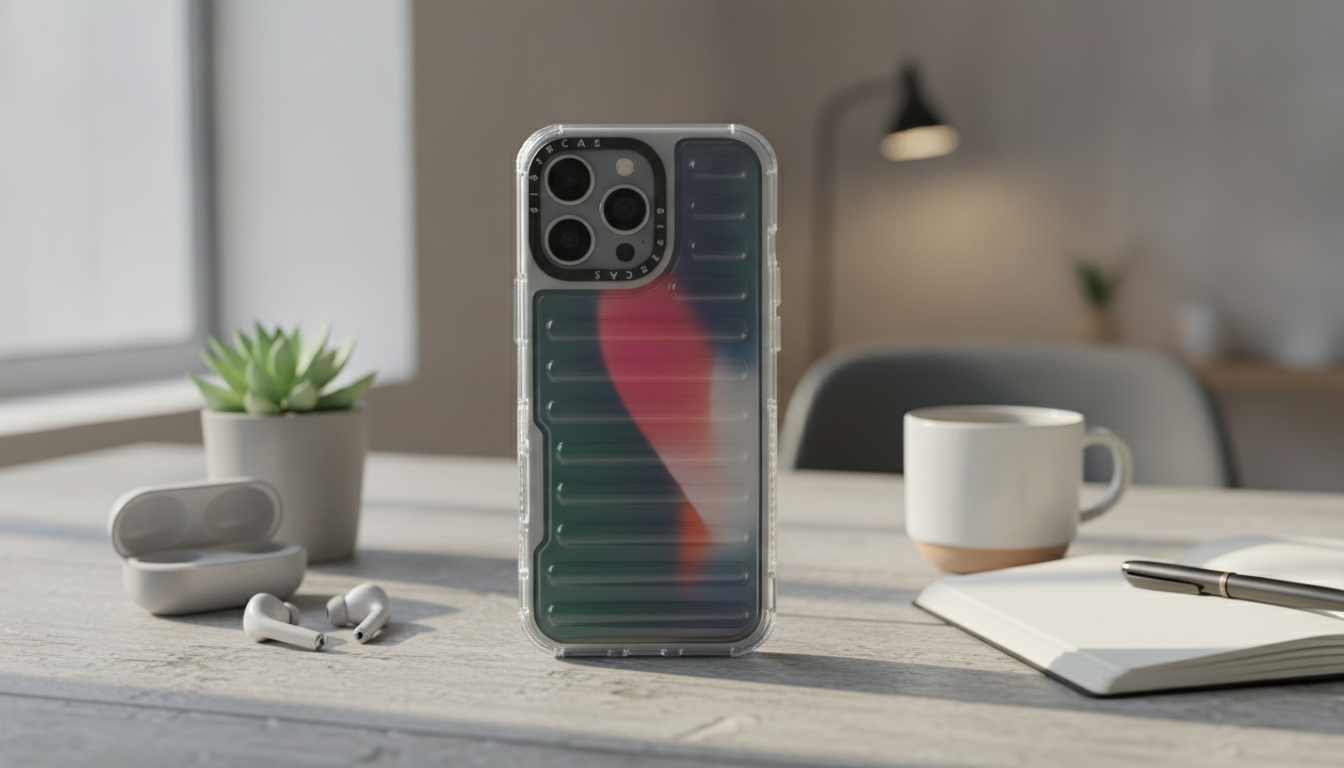
Clear, Full-Coverage Protection for iPhone 16/15/14/13/12
A clear case should do more than show off the iPhone’s color—it should help prevent cracked corners, scuffed edges, and camera-ring damage during everyday drops. The Creative Transparent All-Inclusive Drop Protection Case for iPhone 16, 15, 14, 13, 12 focuses on edge-to-edge coverage with a slim, easy-to-hold feel, adding impact buffering in the areas that usually take the hit first.
Even with a protective case, it’s still smart to treat water exposure seriously—Apple notes that water resistance can decrease over time and liquid damage isn’t covered under warranty in many situations. For practical guidance, see Apple Support: About water resistance and liquid damage on iPhone.
What “All-Inclusive” Protection Means for a Clear Case
“All-inclusive” protection is less about making a phone feel bulky and more about closing the common weak points that get damaged during normal use.
- Edge-to-edge coverage: Designed to reduce exposed areas that often get nicked first—corners, side rails, and the camera zone—so minor bumps don’t go straight to the phone’s finish.
- Raised protection zones: A slight lip around the screen and camera helps keep glass and lenses off flat surfaces like countertops and desks.
- Impact control at corners: Corners typically absorb the first hit in a drop, so reinforced geometry and snug fit matter more than simply adding thickness everywhere.
- Everyday scratch resistance: The clear back panel is meant to take the micro-scratches from pockets, grit, and tabletop sliding, helping preserve the phone’s original look longer.
Design Highlights: Transparent Look with a Secure Grip
Clear cases are popular because they keep the iPhone’s design front and center. The best ones also improve handling so accidental slips are less likely.
- Transparent back: Showcases the iPhone finish while adding a protective layer against scuffs and surface wear.
- Grip-friendly sides: Subtle texture or contouring on the edges (when included) can improve one-handed security—especially helpful on larger iPhone sizes.
- Covered, responsive buttons: Button coverage helps limit dust buildup around the click points while keeping tactile feedback consistent.
- Camera area coverage: A protected camera zone helps reduce scratches around the lens ring from repeated tabletop contact.
Quick specs and fit check
| Feature | Why it matters | What to verify before ordering |
|---|---|---|
| Transparent back | Keeps the original iPhone look visible | Confirm the listed iPhone generation matches the phone exactly |
| All-around edge coverage | Helps protect side rails and corners during angled drops | Check that ports and speakers align with your model |
| Raised screen/camera lip | Reduces direct contact with tables and counters | If using a thick screen protector, ensure the lip doesn’t lift it |
| Corner reinforcement | Corners commonly take the first impact | Look for snug corner fit with no looseness |
| Slim profile | Easier pocket fit and lighter feel | Confirm compatibility with wireless charging setups if used |
Drop Protection in Real Life: What It Can Help Prevent
Most damage doesn’t come from dramatic “phone launched across the room” moments—it comes from daily mishaps and repeated contact with hard surfaces.
- Corner cracks: A buffered corner can reduce the chance of the frame transmitting impact into the front glass during a diagonal drop.
- Back-panel scuffs and chips: A clear back layer can take abrasion instead of your phone’s finish, which is especially useful if you set your phone down on rough surfaces.
- Camera ring scratches: A raised camera edge can help limit metal-on-table friction that causes visible wear over time.
- Everyday bumps: Door frames, car consoles, gym benches, and desk edges are frequent sources of small impacts that add up.
Model Compatibility and Everyday Usability
This style of case is designed for multiple generations—iPhone 16, 15, 14, 13, and 12—so choosing the exact match matters. Small differences in camera cutouts and button placement can affect fit, protection, and feel.
- Choose the exact model: If you’re unsure which iPhone you have, Apple provides a quick identifier guide at Apple Support: iPhone models (identify your model).
- Pocket and hand feel: A slim clear case can add grip and scratch protection without making the phone awkward to hold.
- Wireless charging: Thin clear cases often work with standard chargers, though very thick camera bumps or add-on accessories can affect alignment.
- Accessory fit: If you use docks, car mounts, or thicker third-party cables, verify the cutouts leave enough clearance for secure connections.
Care Tips to Keep a Clear Case Looking Clean
Clear materials can show oils and dust faster than opaque cases, so basic maintenance keeps the case looking “new” longer.
Product Options (In Stock)
- Creative Transparent All-Inclusive Drop Protection Case for iPhone 16, 15, 14, 13, 12 — a clear, full-coverage style aimed at day-to-day drop defense with a minimalist look. Best for keeping corners and the camera zone protected without hiding the iPhone’s finish.
- Corduroy Fabric Strap for Apple Watch — a soft, casual strap option that pairs well with an everyday carry setup, especially if you like a warmer, fabric feel on the wrist.
- Premium Leather Strap for Apple Watch (49mm/45mm/44mm/41mm/40mm) — a classic look for work or going out, with multiple size options for common Apple Watch cases.
FAQ
What iPhone case has the best drop protection?
The “best” drop protection depends on how and where you drop your phone, but strong options typically combine a snug fit, reinforced corners, and raised lips around the screen and camera. When comparing cases, prioritize corner reinforcement and full edge coverage first, then look for any reputable drop-test information when it’s available.













Leave a comment